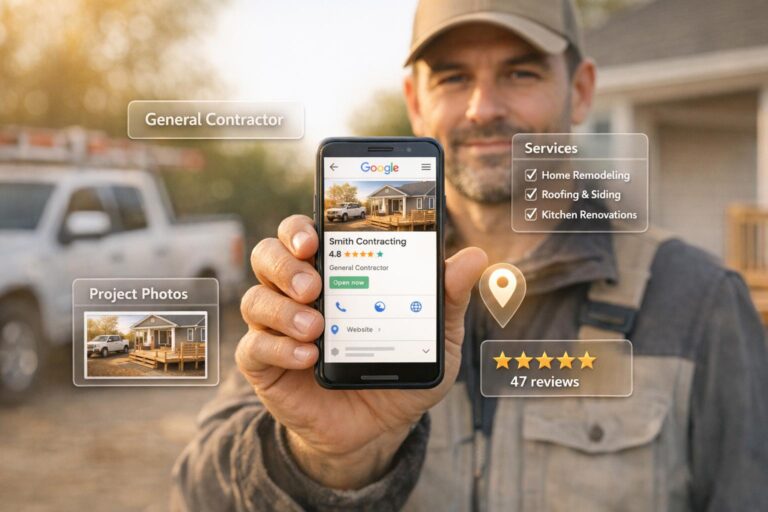
Local SEO is the key to getting your contracting business noticed by potential customers searching for services in your area. If you’re not ranking in local search results, you’re missing out on high-intent leads ready to hire. This guide breaks down 7 actionable steps to improve your visibility and generate more leads:
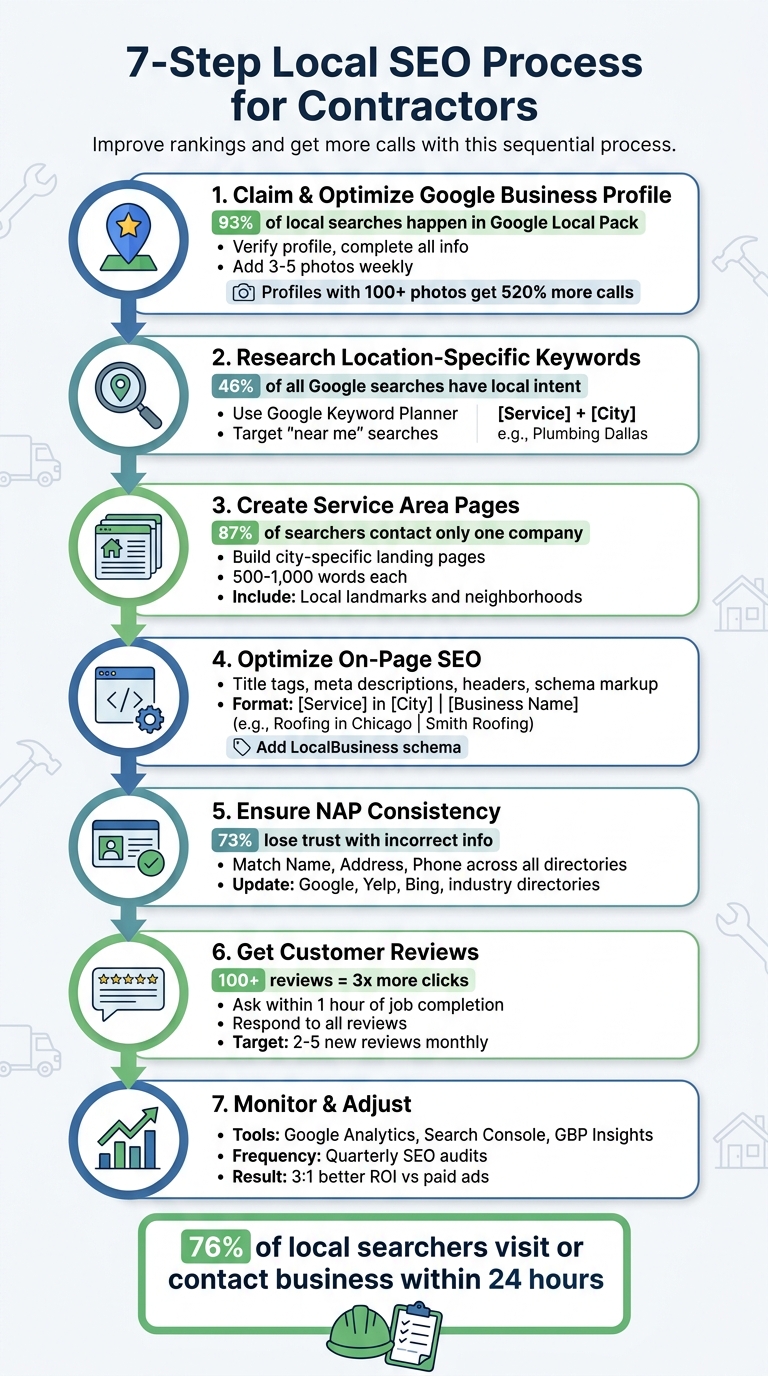
- Claim and Optimize Your Google Business Profile: Ensure your profile is verified, complete, and regularly updated with accurate information, service details, and high-quality photos. Businesses with photos get 42% more direction requests and 35% more website clicks.
- Target Location-Specific Keywords: Use tools like Google Keyword Planner to find phrases combining your services with local terms, such as "roof repair in Springfield."
- Create Service Area Pages: Build individual pages for each city or neighborhood you serve to target specific local searches, like "HVAC repair in Phoenix."
- Optimize On-Page SEO: Refine title tags, meta descriptions, headers, and schema markup to align with local search intent.
- Ensure NAP Consistency: Your Name, Address, and Phone number should match across all directories to avoid confusing search engines.
- Get Customer Reviews: Regularly request reviews from happy customers and respond to all feedback to build trust and improve rankings.
- Monitor and Adjust: Use tools like Google Analytics and Search Console to track performance and refine your strategy.
Key Takeaway: Local SEO is a process that requires consistent effort, but the rewards – like increased leads and reduced cost per lead – are worth it. Start with these steps to position your business for long-term success.
7 Steps to Improve Local SEO for Contractors
Unlock Success with These Local SEO Tips for Contractors
Step 1: Claim and Optimize Your Google Business Profile
Step one lays the foundation for boosting your local search rankings. Your Google Business Profile is essential for local visibility, especially since 93% of local searches and 44% of clicks happen in the Google Local Pack.
Here’s a key stat: businesses with photos see 42% more requests for directions and 35% more clicks to their websites. Even more striking, profiles with 100+ photos receive 520% more calls and 2,717% more direction requests than the average profile.
"If your Google Business Profile is not optimized, you are invisible during the exact moment homeowners are ready to buy." – Contractor Bear Team
Follow these steps to claim, verify, and optimize your profile for maximum impact in local searches.
Claim and Verify Your Profile
Start by claiming your profile at google.com/business using a business-specific email address. Google offers several verification methods, and as of 2026, video verification has become common. This involves recording a short video walkthrough of your worksite or equipment.
| Verification Method | Description | Typical Timeline |
|---|---|---|
| Postcard | Google sends a physical code to your business address. | 5–14 days |
| Video Recording | Upload a video showing your equipment, signage, or location. | Instant to 48 hours |
| Phone/SMS | Receive a code via phone or text message. | Instant |
| A code is sent to your business email address. | Instant |
If your business operates at customer locations instead of a storefront, select "I deliver goods and services to customers at their locations" during setup. This keeps your residential address private while still allowing your business to appear in searches for your service areas.
Complete Your Business Information
After verification, make sure to fully complete your profile. Your primary category is one of the strongest ranking factors, so choose the most specific one that matches your top service – like "HVAC Contractor" over "Heating Contractor".
List all your services (e.g., "Water Heater Replacement") with short, 150–300 character descriptions to make your profile stand out. Use the full 750 characters in your business description to highlight your services, target areas, and what sets you apart. Pay special attention to the first 250 characters, as they appear before the "More" button.
Add relevant attributes like "Licensed and insured", "Free estimates", or "Emergency services available" to provide more details about your business. Use the Q&A section to post and answer common questions about licensing, financing, or service estimates. This lets you address customer concerns upfront and control the conversation.
Add High-Quality Photos
Photos play a big role in ranking. Upload 3–5 new photos weekly instead of posting a large batch all at once. This consistent activity signals to Google that your business is active and operational.
Skip stock images and use authentic photos to build trust. Include pictures of your work, such as before-and-after shots, team members in uniform, and branded vehicles. Rename image files with descriptive names like "kitchen-remodel-allentown-pa.jpg" instead of generic ones like "IMG_123.jpg".
For a competitive edge, take photos on a mobile device with location services turned on. This embeds GPS data, helping Google confirm that you’re working in your claimed service areas. Start by uploading 10–15 high-quality photos, then aim for 50+ to stay ahead of competitors.
76% of people who search for a local business visit or contact it within 24 hours.
Step 2: Research Location-Specific Keywords
Once your Google Business Profile is set up, the next move is digging into location-specific keywords. These keywords act as a bridge, connecting you to people searching for contractors across every trade. Here’s why this step matters: 46% of all Google searches have local intent, and 80% of people looking for home services don’t have a specific company in mind when they start their search. In other words, your keyword choices can make or break your visibility when homeowners are actively seeking help.
The trick is to combine your main services with location-specific terms. Think phrases like "emergency plumber in Springfield" or "water heater installation near me." These types of keywords not only match how people search but also face less competition than broader terms. Plus, since many local searches lead directly to calls or bookings, ranking for these keywords could directly boost your business.
"Local keyword research shows you exactly what nearby customers are typing into Google when they need your service." – Andrew Shum, Head of SEO, SeoProfy
Use Keyword Research Tools
To find the right keywords, start with tools designed for the job:
- Google Keyword Planner: Free with a Google Ads account, this tool provides average monthly search volumes for terms in your area. Pay attention to the "Top of page bid" metric – it hints at how valuable a keyword is, based on what advertisers are willing to pay for it.
- Ubersuggest: Great for discovering variations and related questions. For example, if you search "HVAC repair" and narrow it down to your city, you might find phrases like "HVAC repair cost in Phoenix" or "how much does HVAC repair cost".
- Semrush‘s Keyword Magic Tool: This allows you to filter by neighborhoods, uncovering niche phrases like "emergency pipe repair in [Neighborhood]" that are less competitive.
- Ahrefs Site Explorer: Use this to analyze competitors’ websites. By checking the "Organic Keywords" section and filtering by your city, you can spot gaps in your own keyword strategy.
- Valentin App: This tool shows Google search results for specific zip codes, giving you a clear picture of what local customers see.
These tools will help you gather a solid list of potential keywords. The next step? Narrowing the list to the ones that are realistic and effective for your business.
Find Keywords You Can Actually Rank For
Once you’ve got a list, focus on keywords that are both relevant and attainable. Since you’re competing with a smaller pool of local businesses (typically 10–20), prioritize high-intent keywords – terms that signal someone is ready to hire. Examples include "emergency plumber", "24-hour HVAC repair", or "roof leak repair". These keywords are more likely to convert than generic searches.
Another smart move is targeting long-tail keywords. These are more specific phrases that reflect exactly what a customer is looking for. For instance, "water heater installation" is much more targeted than just "plumber" and often leads to better results. Look for keywords with moderate search volume (around 100 searches per month) and low competition. These can outperform high-volume terms where it’s harder to stand out.
To boost your visibility, use a title tag formula like this:
[Primary Keyword] in [City] | [Business Name]
For example: "Emergency Roof Repair in Springfield | ABC Roofing Co." This format helps both Google and potential customers understand what you offer and where you operate.
Finally, with 70% of home service inquiries coming from mobile devices, make sure to optimize for "near me" searches and natural language queries. Instead of going after broad terms like "kitchen remodel", target specific questions like "average kitchen remodel cost in Austin." These detailed queries often attract customers early in their decision-making process.
Step 3: Create Pages for Each Service Area
To connect with local customers, create dedicated pages for each service area using targeted keywords. By tailoring each page to match specific local search intents, you increase your chances of ranking higher in searches like "roof repair in Springfield" or "HVAC installation in Phoenix." Avoid lumping all service areas into one generic page – this approach dilutes your chances of appearing as the top result for location-specific searches.
Consider this: 87% of construction service searchers contact only one company. If your business isn’t the first relevant result for their city, that potential customer is likely going to your competitor. Plus, with "near me" searches skyrocketing by over 900% in recent years, Google prioritizes results that align with the user’s exact location. Generic, catch-all service pages just don’t cut it anymore.
Here’s how to structure these pages to maximize their effectiveness.
Build City-Specific Landing Pages
Create individual landing pages for each city you serve. For example, if you’re in the roofing business, you might have pages titled "Roof Repair in Springfield", "Roof Repair in Shelbyville", and "Roof Repair in Capital City." These pages target high-intent searches and help convert leads into immediate customers.
The key is to make each page unique. Avoid generic "doorway" pages that simply swap city names without adding real value. Instead, highlight what makes your service in each location stand out. Mention local neighborhoods, landmarks, or community ties to create a personal connection. For example:
- If you serve a coastal area, explain how you address saltwater corrosion.
- In colder regions, describe how you prepare plumbing systems for freezing temperatures.
- Reference city-specific building codes or permit requirements.
Adding project photos and before-and-after images from that city builds credibility. Pair these visuals with testimonials from local customers to provide social proof that resonates with homeowners in the area.
"Service area landing pages are one way to win organic traffic when an SAB [Service Area Business] is being outranked in the local results by a competitor with a physical storefront." – Miriam Ellis, Local Search Subject Matter Expert
Once your pages are live, focus on optimizing their content and usability to ensure they perform well.
Optimize Page Content and Layout
To rank well and engage users, optimize both the content and layout of your service area pages. Start with a clear and descriptive H1 tag. Use a format like:
[Service] in [City, State] | [Business Name].
For example: "Emergency Plumbing in Austin, TX | ABC Plumbing Co." This format helps Google and users immediately understand what the page is about.
Aim for 500 to 1,000 words of unique, helpful content per page. Instead of overloading the page with keywords, focus on providing value. Include a local FAQ section addressing common concerns, such as typical costs, project timelines, or permit requirements. Embedding a Google Map further reinforces your local presence.
Since over 60% of local searches happen on mobile devices, prioritize mobile-friendly design. Make sure pages load in under three seconds and use large, easy-to-read fonts (16px or larger). Add a sticky call button that remains visible as users scroll, and ensure your phone number is clickable for one-tap dialing. Place key elements – like a "Free Estimate" badge, your phone number, and proof of licensing and insurance – above the fold so visitors see them right away.
Lastly, implement LocalBusiness and Service schema markup. This helps search engines understand your geographic service areas and specific offerings. By doing so, you strengthen your local presence and attract more targeted leads.
Step 4: Add Local Elements to Your On-Page SEO
Fine-tuning on-page elements like title tags, meta descriptions, headers, and schema markup can make a big difference in your local search rankings. These tweaks act as signals to search engines, helping them connect your business with local searchers. And the payoff? Around 76% of people who do a local search visit a nearby business within 24 hours, and 28% of those searches end in a purchase or booking. So, getting these details right isn’t just about visibility – it’s about driving real results.
The secret lies in being specific and consistent. Generic content waters down your efforts, but clear, localized elements help search engines associate your pages with local intent. Let’s break down how to optimize these elements for the best results.
Optimize Title Tags, Meta Descriptions, and Headers
Your title tag is one of the first things both Google and potential customers notice. It shows up as the clickable blue link in search results and at the top of browser tabs. To make it effective, use this format: [Service] in [City] | [Business Name]. For example: "Emergency Roof Repair in Springfield | ABC Roofing Co." Keep it under 60 characters so it doesn’t get cut off, and prioritize your main keyword at the beginning.
Your H1 header, on the other hand, is the headline visitors see when they land on your page. It should clearly state the service and location, like "Kitchen Remodeling in Portsmouth, Ohio." This helps users and search engines immediately understand what your page is about.
Meta descriptions work like ad copy. While they don’t directly affect rankings, they play a big role in convincing users to click on your link. Include the service, location, and a call-to-action (CTA). For example: "Top-rated HVAC repair in Dallas. Licensed technicians available 24/7. Call today for a free estimate!" This gives searchers a clear reason to choose your business.
Avoid cramming too many keywords or locations into one title – something like "Plumber Brooklyn NY New York NYC" looks spammy and can hurt your credibility. Instead, create separate pages for each service and location. Adding trust signals like "Licensed & Insured," "Open 24/7," or "Trusted for 20+ Years" can also make your listing more appealing.
Here’s a quick guide to formatting these elements:
| Element | Recommended Format | Example |
|---|---|---|
| Title Tag | [Service] in [City] | [Business Name] |
| H1 Header | [Service] in [City], [State] | Kitchen Remodeling in Portsmouth, Ohio |
| Meta Description | [Service] + [Location] + [Unique Value] + [CTA] | Top-rated HVAC repair in Dallas. Call today for a free estimate! |
For extra impact, use question-based headings like "How much does roof replacement cost in Austin?" followed by a concise answer. This approach can even help you target featured snippets.
Add Local Schema Markup
Schema markup acts like a translator for search engines, clarifying who you are, where you’re located, and what services you offer. With nearly half of Google searches having a local focus, schema markup ensures your business shows up in the right searches.
"Local business schema markup is no longer optional in 2026. It is a structural trust layer that helps Google, Maps, and AI systems understand exactly who you are, where you operate, what you offer, and why your business is legitimate." – LocalMighty
Instead of using the generic "LocalBusiness" schema type, choose a specific subtype. For example, a roofer should use RoofingContractor, an HVAC specialist should use HVACBusiness, and a plumber should use Plumber. This specificity helps search engines connect your business to relevant queries.
Key details to include in your schema:
- Business name, address, and phone number (NAP)
- Geo-coordinates (latitude and longitude)
- Operating hours
- Service areas (use the areaServed property and a geoRadius for service-based businesses without storefronts)
You can also use advanced schema types to stand out. For instance:
- Service schema: Highlight specific offerings like "Emergency AC Repair."
- AggregateRating schema: Display star ratings in search results to boost click-through rates.
- FAQ schema: Add expandable questions directly in search results for more visibility.
Before publishing, always validate your schema using tools like the Google Rich Results Test or Schema Markup Validator. Errors can hurt your rankings, so it’s worth double-checking.
Here’s proof that schema works: In 2026, Ryan Amato Painting used structured data as part of a local SEO strategy and saw a 120% jump in SEO leads and a 60% boost in local traffic. Similarly, Boss Mechanical, an HVAC company, increased total leads by 65% and reduced their organic cost per lead by 70% after focusing on service-area visibility and structured data.
While schema markup might not directly improve rankings, it builds trust and clarity for search engines. When paired with optimized title tags, headers, and meta descriptions, it creates a complete, easy-to-understand picture for both search engines and potential customers.
sbb-itb-c45215a
Step 5: Keep Your NAP Consistent Across All Directories
Your NAP – Name, Address, and Phone number – needs to be consistent across every online directory. Even small differences, like using "Street" instead of "St." or "Suite 100" instead of "#100", can confuse search engines. These platforms rely on NAP data to confirm your business’s legitimacy and location. When inconsistencies occur, it weakens your local SEO efforts by splitting signals across multiple listings.
In fact, inconsistent NAP details can lower your rankings by 2–3 positions, and citation signals, including NAP consistency, account for about 11% of local ranking factors. Additionally, 73% of consumers lose trust in businesses with incorrect information online.
"NAP consistency is one of the most controllable and impactful factors in Local SEO." – Bright SEO Tools
To start, create a master document with your official NAP format. This will serve as your reference for all listings. Use tools like the USPS ZIP Code Lookup to confirm the proper formatting of your address. Decide on standard abbreviations (e.g., always use "Street" instead of "St.") and stick to them everywhere.
List Your Business on Local Directories
Your Google Business Profile should be your first priority – it’s the main reference point for search engines. Once updated, allow 24–48 hours for the changes to take effect. Then, update your information on other major and local directories. Focus on these platforms:
- Tier 1 (Core): Google Business Profile, Apple Maps, Bing Places, Yelp, and Facebook.
- Tier 2 (Industry-Specific): For contractors, key directories include Angi, Houzz, HomeAdvisor, Thumbtack, and Better Business Bureau.
- Tier 3 (Local): Don’t ignore local directories like your Chamber of Commerce or city-specific business associations, which still carry weight for local SEO.
Data aggregators such as Data Axle, Neustar Localeze, and Foursquare are also important. These services distribute your information to smaller directories, helping you fix multiple inconsistencies at once.
| Directory Type | Key Platforms for Contractors |
|---|---|
| Major Search/Maps | Google Business Profile, Bing Places, Apple Business Connect, MapQuest |
| General Directories | Yelp, Yellow Pages, BBB.org, Facebook, Foursquare |
| Home Services Specific | Angi, Houzz, HomeAdvisor, Thumbtack, Porch, HomeStars |
| Local/Trust Signals | Chamber of Commerce, Nextdoor, Manta, Hotfrog |
When filling out forms, use "Line 1" for your street address and "Line 2" for suite or unit numbers to maintain consistency. Always use your legal business name exactly as it appears on signage and registration, avoiding keyword stuffing in the name field. Also, ensure your NAP is in crawlable HTML text on your website – not embedded in images – so search engines can easily index it.
Once your listings are live, double-check their accuracy to ensure your local SEO signals are unified.
Find and Fix NAP Errors
Start with a manual search: enter your business name, phone number, or address in quotes on Google to uncover outdated or duplicate listings. This can help you identify old profiles or incorrect information you might have missed.
For a deeper audit, automated tools can save time:
- BrightLocal: Offers citation tracking, consistency monitoring, and manual cleanup services, starting at $29–$39/month.
- Whitespark: Costs around $20 per report or $33/month and is particularly effective for finding industry-specific directories.
- Moz Local: Priced at about $14/month, it focuses on distributing information to major aggregators.
"Accuracy + Consistency + Monitoring = Strong Local SEO Performance." – Alex Zweydoff, CEO, ClearLead Digital
Before creating new listings, check for and suppress duplicates. Duplicate profiles can divide customer reviews and even lead to penalties from Google. Merging or removing duplicates helps consolidate your authority.
Plan to conduct a full citation audit every 3–6 months or immediately after major changes like a move or new phone number. Fixing NAP inconsistencies can improve rankings within 4–8 weeks as search engines re-crawl and re-index the updated data. If your business relocates, focus on updating your top 50 citations within the first 30 days to avoid disruptions.
Finally, add "LocalBusiness" structured data markup to your website’s HTML. This helps search engines confirm your NAP details. Aim for a consistency score of 90% or higher across all major platforms to strengthen your local search presence.
With your NAP details aligned across directories, you’re ready to move on to Step 6: gathering and showcasing customer reviews.
Step 6: Get and Display Customer Reviews
Step 6 is all about turning customer feedback into a tool that boosts your local SEO. Reviews play a key role in local search rankings, alongside your Google Business Profile and location details. Google looks at the number of reviews, overall ratings, how recent they are, and how consistently new ones come in. For instance, a contractor consistently adding 8–12 reviews each month can often outrank competitors with more total reviews but less recent activity.
Reviews don’t just help with rankings – they also directly affect click-through rates. Businesses with over 100 reviews get three times more clicks from the Google Maps local pack. Considering that 87% of consumers read online reviews for local businesses – and most people check 5–10 reviews before reaching out to a contractor – your review profile is crucial for building both visibility and trust. When customers mention specific services and locations in their reviews, it strengthens your connection to those local searches on Google.
Ask Customers for Reviews
Timing is everything. The best time to ask for a review is within 1 hour of job completion when customers are most satisfied. Requests sent during this window have a 70% higher response rate than those sent 24 hours later.
SMS is a great way to ask for reviews, with its 98% open rate, and including a direct review link makes the process even easier. For example, one HVAC contractor used ServiceTitan to automate review requests 45 minutes after finishing a job. This increased their response rate from 8% to 34%. Another plumbing business incentivized technicians with a $20 bonus for being mentioned by name in 5-star reviews, raising their monthly review count from 3–4 to 12–15 in just two months.
The 3-Touch System can also be effective:
- Send the first request within 1 hour of job completion.
- Follow up with a text or email 24–48 hours later.
- Send a final, polite reminder 5–7 days later if there’s no response.
You can also use QR codes on business cards, invoices, or flyers to make it easy for customers to leave a review on the spot. Encourage customers to mention the service they received and the location to naturally include local keywords.
| Market Size | Competitive Review Baseline | Monthly Velocity Target |
|---|---|---|
| Small (Under 50K pop.) | 15–25 reviews | 1–2 new reviews |
| Mid-sized (50K–200K pop.) | 25–40 reviews | 2–3 new reviews |
| Large (200K+ pop.) | 40–60+ reviews | 3–5 new reviews |
Important: Never offer discounts or gifts to customers in exchange for reviews. This violates Google’s terms of service and FTC guidelines. However, rewarding your team for their role in getting reviews is perfectly acceptable and often very effective.
Once you’ve streamlined your review process, shift your focus to engaging with customer feedback.
Respond to All Reviews
Responding to reviews shows Google and potential customers that your business is active and attentive. Businesses that reply to every review tend to get 12% more reviews on average than those that don’t.
For positive reviews, keep your responses short and personal. Use the customer’s name and reference the specific service or project. For example:
"Thanks, Sarah! We’re thrilled your kitchen remodel turned out exactly how you envisioned it. Enjoy the new space!"
For negative reviews, aim to respond within 24 hours. Stay professional and empathetic. Acknowledge the concern, apologize without admitting fault, and offer to resolve the issue offline. Surprisingly, addressing negative feedback thoughtfully can build trust – 45% of consumers say they’re more likely to hire a contractor who responds professionally to bad reviews.
"A thoughtful response to a 1-star review can actually increase trust. Homeowners reading reviews expect to see an occasional negative one. How you respond tells them more about your character than a wall of 5-star ratings." – Pipeline Research Team
Avoid being defensive or emotional. Focus on solutions and move the conversation offline to protect your reputation while showing others that you care about resolving issues.
Add Reviews to Your Website
Featuring customer testimonials on your website boosts credibility and helps build trust with potential clients. Place reviews on your homepage, service pages, and city-specific landing pages to increase local relevance.
Use review widgets and add schema markup to enhance both credibility and search visibility. Include details like the customer’s name, location, and the specific service they hired you for. For example:
"John from Riverside hired us for a full bathroom remodel in March 2025 and gave us 5 stars."
This approach reinforces local keywords and makes the testimonial feel more personal.
Encourage customers to upload photos of the completed work in their reviews. Visual proof builds trust faster and is preferred by over half of consumers.
Reaching 100 reviews is a major milestone. For example, a roofing contractor saw a 47% increase in Google Maps clicks within two months of hitting 100 reviews without changing their marketing spend. Another restoration company experienced a 62% jump in Google Maps impressions and a 38% increase in calls after surpassing 200 reviews.
Step 7: Monitor Results and Adjust Your Approach
Once you’ve laid the groundwork, the real work begins – keeping an eye on your local SEO performance and making adjustments as needed. Local SEO isn’t a “set it and forget it” deal. Contractors who regularly track their performance and conduct quarterly audits see better results than those who don’t. With your profile, keywords, and reviews in good shape, the next step is to fine-tune your strategy based on data.
Track Performance with Analytics Tools
Several tools can help you measure the effectiveness of your local SEO efforts:
- Google Business Profile Insights: This tool shows how often your business appears in direct and discovery searches. It also tracks key actions like phone calls, website clicks, and direction requests, giving you a clear picture of local lead flow.
- Google Search Console: Use this to monitor keyword rankings, impressions, and click-through rates. Look for keywords ranking in positions 4–10 – these are opportunities for quick improvements with small adjustments. If you notice high impressions but low click-through rates, tweak your title tags or meta descriptions to make them more compelling.
- Google Analytics: This tracks organic traffic and lead conversions. Set up specific conversion events to measure how well your site generates leads. Break down traffic data by service or city pages to see which areas or services are driving the most revenue.
- Call Tracking Services: Tools like CallRail or WhatConverts help you trace leads back to their source. Assign unique phone numbers to each marketing channel, and use Dynamic Number Insertion to maintain consistent NAP (Name, Address, Phone) details.
Real-world examples show the impact of performance tracking. In early 2026, Ryan Amato Painting’s local SEO strategy led to a 120% boost in SEO-driven leads and a 60% increase in local traffic. Likewise, Boss Mechanical focused on metrics tied to outcomes, achieving a 65% rise in total leads and cutting their organic cost per lead by 70%.
| Metric | What It Measures | Why It Matters for Contractors |
|---|---|---|
| Organic Traffic | Visitors from unpaid search | Shows early signs of visibility growth |
| GBP Actions | Calls, clicks, and directions | Indicates local lead flow from Google Maps |
| Conversion Rate | Percentage of visitors converting | Measures how well your site turns traffic into leads |
| Lead Quality | Close rate and job size | Ensures SEO efforts bring in profitable projects |
"Clients don’t renew contracts based on ranking improvements. They renew based on business growth. Your metrics need to tell the revenue story, not the SEO story."
– Anya Leibovitch, Marketing Analytics Contributor, AgencyAnalytics
Once you’ve analyzed these metrics, use the insights to refine your strategy during routine audits.
Run Regular SEO Audits
Quarterly SEO audits are essential for spotting and fixing issues before they hurt your rankings. Here’s what to focus on:
- Technical Setup: Check for mobile load speeds under 3 seconds, broken links, and correct schema markup. Use Google Search Console to identify crawl errors and ensure all important pages are being indexed properly.
- NAP Consistency: Make sure your Name, Address, and Phone details match across all directories. Tools like BrightLocal (starting at $29/month) can help you find and fix discrepancies.
- Keyword Rankings: Monitor your primary keywords weekly to track trends and identify areas for improvement. Tools like LocalFalcon or BrightLocal allow you to view rankings across a geographic grid, which can reveal location-specific opportunities.
Keep in mind that AI-generated overviews now appear for around 9% of transactional keywords. To increase your chances of being featured, ensure the opening sentence on your service pages clearly answers common questions.
"The contractors who dominate the map pack in their area do these basics consistently. They don’t chase shortcuts. They build the machine and keep it running."
– Charwin Vanryck deGroot, BKND
Expect initial results within three months, with steady growth following. By month seven, compounding benefits typically kick in. Over a 12-month period, SEO leads for contractors often deliver a 3:1 better ROI compared to paid ads, with costs ranging from $20 to $50 per lead versus $75–$150 for Google Ads.
Conclusion
Local SEO for contractors isn’t a quick fix – it’s a long-term strategy for consistent lead generation. The seven steps outlined earlier form a cohesive system: your Google Business Profile ensures visibility in the Map Pack, your website establishes credibility and depth, and consistent reviews paired with accurate NAP (Name, Address, Phone) details prove your legitimacy to both Google and potential customers.
When you combine profile optimization, keyword targeting, review management, and regular audits, each piece strengthens your local authority. For example, service-specific and location-specific pages attract high-intent "near me" searches, while quarterly audits help you fine-tune your strategy based on real-world data. Together, these efforts amplify your presence and deliver lasting results.
"If you’re a contractor who does great work but still isn’t showing up on Google, you don’t have an SEO problem, you’ve got a process problem."
– Patrick Scully, SEO Specialist
Unlike paid ads, which stop working the moment you stop paying, SEO builds lasting digital equity. Many contractors who have embraced these strategies report a noticeable uptick in leads and a drop in cost per lead.
The top contractors in local markets don’t rely on shortcuts. They consistently update their profiles, request reviews immediately after completing jobs, ensure NAP information is always accurate, and conduct quarterly audits to stay ahead of potential issues. Start applying these seven steps today, stick to the process, and track your progress monthly. Build the system, keep it running, and watch your local visibility – and your business – thrive.
FAQs
How long does local SEO take to work for contractors?
Local SEO for contractors typically begins to yield visible results within 3 to 6 months, provided there’s consistent effort. That said, reaching optimal outcomes can take anywhere from 6 to 12 months, influenced by factors like the competitiveness of the local market and the extent of optimization efforts.
What should I do if I’m a service-area business with no storefront?
If your business provides services in a specific area but doesn’t have a physical storefront, it’s a good idea to hide your address on your Google Business Profile. This helps present your business accurately and prevents confusion since customers won’t be visiting a physical location. Instead, concentrate on optimizing your profile by clearly outlining the regions you serve and establishing trust within those areas.
Which local SEO task should I prioritize first if I’m short on time?
If you’re pressed for time, the first thing to tackle in local SEO is your Google Business Profile (GBP). Why? Because this directly impacts how visible your business is in local search results and on Google Maps. A well-optimized GBP ensures your business catches the eye of potential customers searching for services in your area. It’s your chance to make a strong first impression and stand out in local searches.