Your Google Business Profile (GBP) is the most effective free tool to attract local leads for contractors. Here’s why it matters:
- 93% of local searches show the Google Map Pack, often above traditional website results.
- 76% of users contact a business within 24 hours of a local search.
- Businesses with complete profiles get 7x more clicks than incomplete ones.
- Profiles with 100+ photos see 520% more calls and 2,717% more direction requests.
In 2026, Google’s AI relies heavily on your GBP details – like reviews, services, and Q&A – to answer user queries. With 60% of searches ending without a website click, optimizing your profile is critical for visibility and leads.
Key steps to optimize your GBP:
- Claim and verify your profile (video verification is common for contractors).
- Choose specific categories (e.g., "Kitchen Remodeler" instead of "General Contractor").
- Set precise service areas (list cities and ZIP codes, not radiuses).
- Add detailed services (e.g., "Emergency Drain Cleaning" with short descriptions).
- Upload high-quality photos and videos (geo-tagged and regularly updated).
- Request and manage reviews (respond quickly and politely to all feedback).
- Use Google Posts to share updates, offers, or project highlights.
An optimized GBP can generate 20-50 monthly leads and significantly boost your local presence. Start by refining categories, uploading photos, and asking for reviews to maximize your profile’s potential.
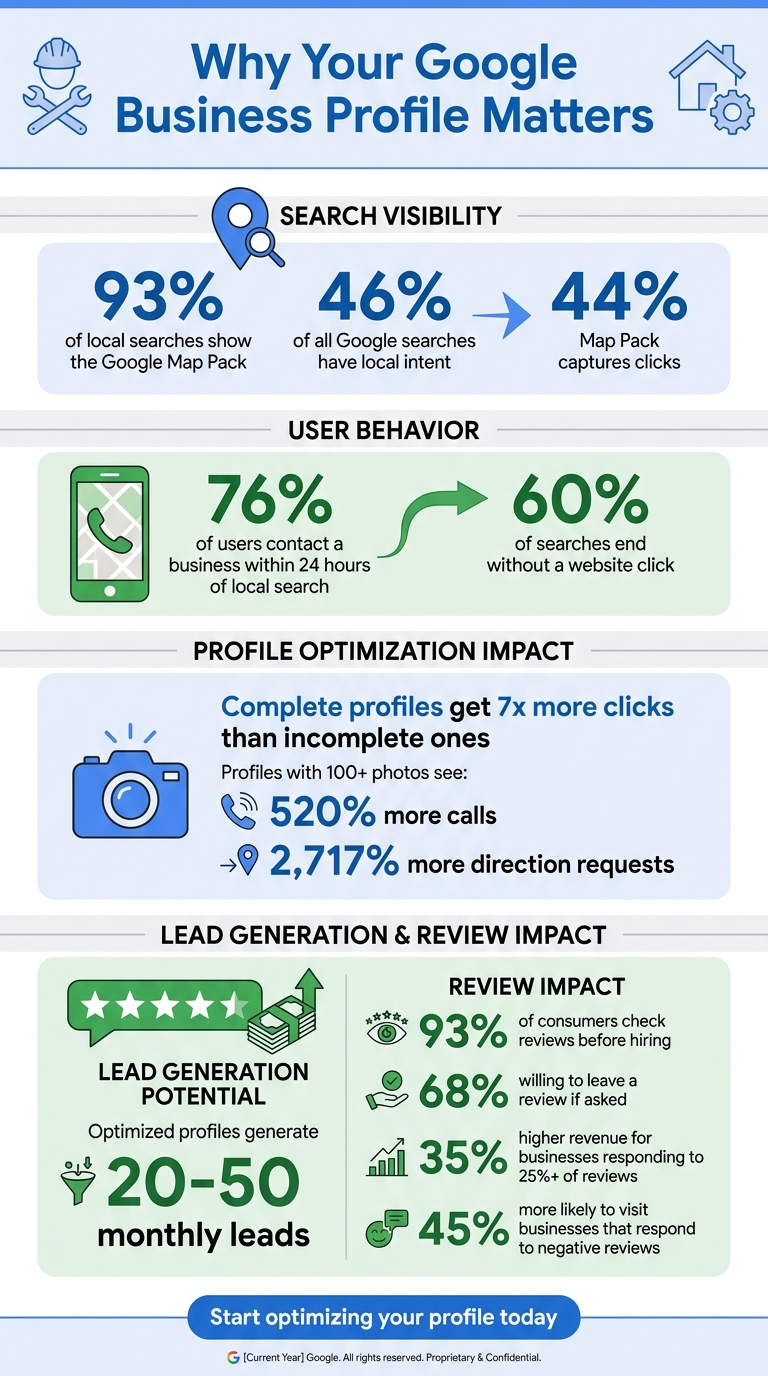
Google Business Profile Statistics for Contractors: Impact on Local Leads
Setting Up and Verifying Your Google Business Profile
How to Claim Your Profile
Start by checking if your business already has a Google Business Profile. Head to Google Maps or google.com/business, type in your company name, and see if a listing pops up. If one exists, hit "Claim this business" or "Manage now" to take ownership. If no profile is found, you can create one by going to business.google.com/add and filling in details like your business name, category, and service area.
When setting up your profile, always use a dedicated business email (e.g., owner@yourbusiness.com) rather than a personal Gmail account. This ensures you retain control over the profile, even if you change roles or an employee leaves. Local SEO expert Zachary Hoppaugh emphasizes this point:
"Ownership tied to a personal account you might lose is a recipe for losing your profile later."
If someone else has already claimed your profile – like a former employee or a marketing agency – you’ll need to click "Request Access" and ask them to transfer ownership. For service-area businesses (like contractors across every trade) that travel to customers instead of operating from a physical location, select the option "I deliver goods and services to customers at their locations." This keeps your residential address private and maintains a professional image.
Once you’ve claimed or created your profile, the next step is to verify it using a method that works for your business type and location.
Verification Methods
Google determines the verification method based on your business type and location. For contractors, video verification is currently the most common. This involves recording a 30-second, unedited walkthrough showcasing proof of your business, like branded vehicles, tools, equipment, or an active job site. Google typically reviews these videos within five business days.
Other verification options include:
- Phone or SMS: Receive an instant verification code via text or call.
- Postcard: Google mails a code to your business address, which usually arrives within 5–14 days and must be used within 30 days.
- Email: Available for businesses with verified domain-based email addresses.
- Live Video Call: Connect with a Google support representative in real time.
While verifying, avoid making changes to your business name, address, or category. Doing so could invalidate your verification code and force you to restart the process. Once your profile is verified, you’ll gain full access to optimize it and start attracting more leads.
sbb-itb-c45215a
Optimizing Your Profile’s Core Features
Choosing the Right Business Categories
Your primary category is the most critical part of your profile. According to SEO experts, it’s the top factor affecting local search performance. This category tells Google exactly what your business does and which searches to prioritize.
Pick the most specific category that aligns with your most profitable service. For example, if kitchen remodels are your top revenue source, go with "Kitchen Remodeler" instead of the broader "General Contractor". Similarly, plumbers should usually select "Plumber" over "Plumbing Service" in most areas. HVAC businesses should use "HVAC Contractor" as their main category, then layer in specific services like "Air Conditioning Contractor" or "Furnace Repair Service" as secondary categories.
You can add up to nine secondary categories to broaden your reach. Stick to 5–8 closely related services – like "Water Heater Installation Service" or "Drain Cleaning Service" for plumbers. Avoid listing services you don’t actually provide, as this weakens your primary category’s impact. Google often updates its category options, so check every three months to ensure your selections remain relevant.
| Trade | Primary Category | Secondary Categories |
|---|---|---|
| Plumbing | Plumber | Water Heater Installation Service, Drain Cleaning Service, Plumbing Repair Service, Gas Installation Service, Sewer Service |
| HVAC | HVAC Contractor | Air Conditioning Contractor, Heating Contractor, Furnace Repair Service, Air Duct Cleaning Service |
| Electrical | Electrician | Electrical Installation Service, Lighting Contractor, Generator Installation Service, EV Charging Station Contractor |
| Roofing | Roofing Contractor | Roof Repair Service, Gutter Cleaning Service, Siding Contractor |
| Remodeling | Kitchen Remodeler | General Contractor, Basement Remodeler, Home Improvement Contractor, Deck Builder |
Be aware that updating or adding categories may require re-verification of your business by Google. Pair your selected categories with detailed entries in the "Services" tab to enable "Provides:" justifications in search results. This can increase click-through rates by making your services more visible and specific. After refining your categories, focus on setting up your service areas.
Setting Your Service Areas
Define your service areas by listing specific cities, ZIP codes, or regions (up to 20). Google no longer accepts radius-based settings, so stick to precise boundaries. Ideally, your service area should cover locations within a two-hour drive from your base.
If you’re a service-area business (e.g., you visit customers rather than hosting them at a storefront), hide your physical address and list the cities you serve instead. This keeps your profile professional and relevant. Avoid general regions – be as specific as possible with your cities and ZIP codes to improve local search relevance.
Here’s a tip: take photos at job sites with location services turned on. Uploading geotagged images to your profile helps Google associate your business with those specific areas. This can boost your visibility in searches from those locations. Once your service areas are set, double-check your business details to solidify your local presence.
Completing Your Business Information
Accurate business details are essential for building trust and improving your local rankings. Your NAP (Name, Address, Phone) should match exactly across your Google profile, website, and directories. Even small differences – like "123 Main St" versus "123 Main Street" – can lower Google’s confidence in your business.
Use a local area code for your phone number to boost local relevance. If you’re using a call tracking number, make it your primary number and include your main line as a secondary contact. Update your business hours carefully, and use the "More hours" feature to add specifics for services or holiday closures. This prevents "Closed" warnings, which can frustrate potential customers.
Write a concise business description – up to 750 characters, with the most important details in the first 250. Highlight your mission and services without overloading it with keywords or city names. For example, avoid naming your business "ABC Plumbing – Best Philly Plumber", as Google may penalize or suspend profiles for keyword stuffing.
Fill out the "Attributes" section to showcase features like "Veteran-led", "Online estimates", or "Emergency services". Use the Services tab to list individual offerings with short descriptions. Entries like "Emergency Pipe Repair" or "Water Heater Installation" help Google’s AI understand your expertise and match you with specific homeowner searches in today’s AI-driven search landscape.
Optimizing Google Business Profile for Contractors
Adding Photos and Videos to Your Profile
Visual content plays a huge role in showcasing your work and building trust with potential customers. High-quality images and videos can make your Google Business Profile stand out. In fact, visuals now take up 36% of the Local Pack screen and drive 88% of local search interactions. By using photos and videos effectively, you can highlight your professionalism and the quality of your work.
Uploading Project Photos
Photos can tell a powerful story, especially when they show your expertise. For example, before-and-after shots taken from the same angle are a great way to demonstrate your skills. To give your images an SEO boost, rename the files with relevant keywords (e.g., "luxury-kitchen-remodel-chicago.jpg"). You can also enable location services when taking photos at job sites or manually geo-tag them later to confirm the authenticity of the location.
To add a personal touch, include three "in-action" photos of your team at work and several team portraits. Photos of company vehicles and equipment can further showcase your professionalism. Also, consider taking exterior shots of your building or job sites from different angles and at various times of day. These can help customers recognize your business more easily.
When uploading, ensure your images are between 10 KB and 5 MB in size, in JPG or PNG format, and have a resolution of at least 720 x 720 pixels. Use bright, natural lighting and avoid heavy filters, as Google prefers images that look realistic. For your cover photo, choose a standout project and use a 1024 x 576-pixel image with a 16:9 aspect ratio.
These photos set the stage for engaging video content, which can take your profile to the next level.
Creating Video Content
Videos can grab attention like nothing else, generating 2–3 times more engagement than photos. Keep your videos short – under 30 seconds – with a resolution of at least 720p and a file size below 75 MB. Consider creating project walkthroughs of completed work, time-lapse videos showing a project from start to finish, or side-by-side before-and-after comparisons. Client testimonial videos are another great way to build trust quickly.
Don’t forget to update your profile with fresh photos and videos regularly. Once uploaded, it may take 24 to 48 hours for new media to appear publicly after your profile is verified.
Managing Reviews and Customer Questions
Managing reviews effectively plays a key role in boosting your Google Business Profile and driving local contractor leads. Reviews are powerful – 93% of consumers check them before hiring, and 68% are willing to leave one if asked.
Getting More Positive Reviews
Timing is everything when asking for reviews. Aim to request reviews during moments of high satisfaction, like after a final walkthrough or a successful inspection. As Ricorda puts it:
"The final walkthrough is when the customer is most emotionally connected to the result – and most willing to tell the world about it".
A personalized text message sent within 24 hours of project completion works wonders. Mention specific details about the work (e.g., "your basement finish") to make it personal. Why SMS? It has a 98% open rate, far outperforming email’s 20%. If you don’t hear back, send a polite reminder about a week later.
Don’t stop there – make it easy for customers to leave reviews. Add QR codes to invoices, project cards, and warranty binders. You can even follow up a year later, using the expiration of a labor warranty as an opportunity to check in and gently ask for feedback.
However, steer clear of offering incentives for reviews. Google is very clear on this:
"Offering incentives, like free or discounted goods or services, in exchange for customers to post reviews… is strictly prohibited".
Once reviews start coming in, responding quickly and thoughtfully is just as important as getting them.
How to Respond to Reviews
How you handle reviews – both positive and negative – can influence potential customers more than the reviews themselves. 45% of consumers are more likely to visit a business that responds to negative reviews, and businesses that reply to at least 25% of their reviews see 35% higher revenue on average compared to those that don’t respond at all.
For positive reviews, go beyond a generic "thank you." Personalize your response by addressing the customer by name and mentioning specific details about their project. This shows genuine appreciation and avoids the impression of automated replies.
For negative reviews, use the A.A.R. Framework:
- Acknowledge the issue.
- Apologize without admitting fault.
- Redirect the conversation offline by providing a phone number or email.
Respond within 24 hours to show professionalism and care. As the Contractor Bear Team explains:
"How you respond to bad reviews often matters more than the review itself. Potential customers are watching. They’re not looking at whether you have a perfect 5.0 rating – they’re looking at how you handle adversity".
Avoid public arguments, even if the review feels unfair. Interestingly, 68% of consumers trust reviews more when they see a mix of positive and negative feedback rather than an unblemished 5.0 rating. After resolving the issue privately, politely ask the customer if they’d consider updating their review. Surprisingly, 30-40% of customers revise negative reviews after a positive resolution offline.
Using Additional Profile Features
Once you’ve nailed the basics of your profile, it’s time to tap into extra tools that can boost your local visibility. Google Business Profile offers features that help contractors stand out in local search results and provide more value to potential clients. Surprisingly, less than 20% of local businesses use these tools, giving you a real edge.
Publishing Google Posts
While visuals build trust, consistent updates keep your profile lively and relevant. Google Posts let you share updates, promotions, or project highlights directly on your profile. These posts appear in the "Updates" tab on mobile and the "From the owner" section on desktop. Plus, Google’s AI pulls content from these posts to answer local queries like "Who does furnace installation near me?".
You can choose from three types of posts:
- Updates: Perfect for showcasing before-and-after photos or company news.
- Offers: Promote seasonal deals with options like a "View Offer" button or coupon codes.
- Events: Announce workshops or specials like seasonal tune-ups.
Keep in mind that standard posts lose their prominence after seven days, though they remain visible on your profile. To stay fresh, aim to post every 7–10 days.
For maximum impact, use real photos from your job sites – skip the stock images. Mention the city or neighborhood in your description (e.g., "Completed a roof repair in Austin") to strengthen local ranking signals. Keep posts concise, ideally between 100 and 200 words, and always include a call-to-action button like "Call Now", "Book", or "Learn More." Avoid adding phone numbers directly in the text to steer clear of Google’s content filters.
Listing Your Services
The Services tab is where you detail everything you offer. Instead of general terms like "Plumbing", get specific with services like "Tankless Water Heater Installation" or "Emergency Drain Cleaning." This level of detail improves your profile’s visibility in local searches. Each service should have a 150–300 character description explaining what you do, your process, and the areas you serve. Including price ranges can also help filter out unqualified leads. If Google’s pre-listed services don’t align with your expertise, create custom services to target niche search traffic.
| Contractor Type | Primary Category | Recommended Secondary Categories |
|---|---|---|
| HVAC | HVAC Contractor | Air Conditioning Contractor, Heating Contractor, Furnace Repair Service |
| Roofing | Roofing Contractor | Roofer, Metal Roofing Contractor, Gutter Installation Service, Siding Contractor |
| Plumbing | Plumber | Emergency Plumber, Drain Cleaning Service, Water Heater Installer |
| Electrical | Electrician | Electrical Installation Service, Lighting Contractor |
| General | General Contractor | Kitchen Remodeler, Bathroom Remodeler, Home Builder |
Conclusion
Your Google Business Profile is one of your most visible assets for local visibility. With 46% of all Google searches having a local focus and the Map Pack pulling in 44% of clicks, this free tool plays a major role in helping homeowners discover your business.
The basics are simple: select the right primary category (the top-ranking factor), fill out every field – including the Services tab – upload high-quality project photos, and consistently gather reviews. Profiles that are fully completed and feature active photo galleries tend to attract far more clicks and leads.
But you can take things further. By 2026, Google’s AI will rely heavily on your Services tab, review content, and Q&A section to respond to specific local queries. That means the effort you invest in detailing your services and curating your Q&A section now will directly impact how often you show up in AI-driven searches.
An optimized profile has the potential to generate between 20 and 50 high-quality leads each month. Start improving your profile this week: confirm your primary category, fully complete your services section, add recent project photos, and begin posting regularly on Google Posts. These updates show Google that your business is active and engaged.
To measure your success, use UTM parameters and a dedicated phone number to track job inquiries coming from your profile. This allows you to turn your profile into a reliable, data-driven tool for generating leads.